
On this page
- What is a standard operating procedure?
- The anatomy of an SOP
- How to write an SOP
- Example 1: Customer refund SOP for a small online store
- Example 2: New employee onboarding SOP for a small office
- Blank SOP template (copy and fill in)
- SOP writing checklist
- Common SOP mistakes
- Frequently asked questions
- What is an example of a standard operating procedure?
- What should an SOP include?
- How long should an SOP be?
- Who should write an SOP?
- How often should SOPs be reviewed?
Quick answer: A standard operating procedure (SOP) is a short written document that tells your team exactly how one recurring task gets done: who does it, in what order, and how fast. The fastest way to understand one is to read a finished example, so this guide gives you two complete ones you can copy, a refund SOP for a small online store and an onboarding SOP for a small office, plus the blank template they were built from.
Every small business has procedures. The problem is that most of them live in one person’s head. When that person is away, the task slows down, gets done a different way, or gets forgotten. An SOP moves the method out of someone’s memory and onto one page that anyone can follow.
What is a standard operating procedure?
An SOP is a set of step-by-step instructions for a task your business repeats. TechTarget describes SOPs as documents that record how work is done so it stays consistent, and notes they are used everywhere from manufacturing and finance to customer service, healthcare, and hiring. If a task happens every week and the result should look the same each time, it is a candidate for an SOP.
An SOP is not a policy and not a job description. A policy states a rule (“we refund faulty items within 30 days”). A job description lists what a role covers. An SOP is the working method in between: the numbered steps a named person follows to carry the rule out, with a time limit on each step.
SOPs also double as training material. BDC describes them as a source of information that reinforces the training employees have already received, so staff can do the work with confidence instead of interrupting a manager for every step. That is the real payoff: the knowledge stays in the business, not in one person’s memory.
The anatomy of an SOP
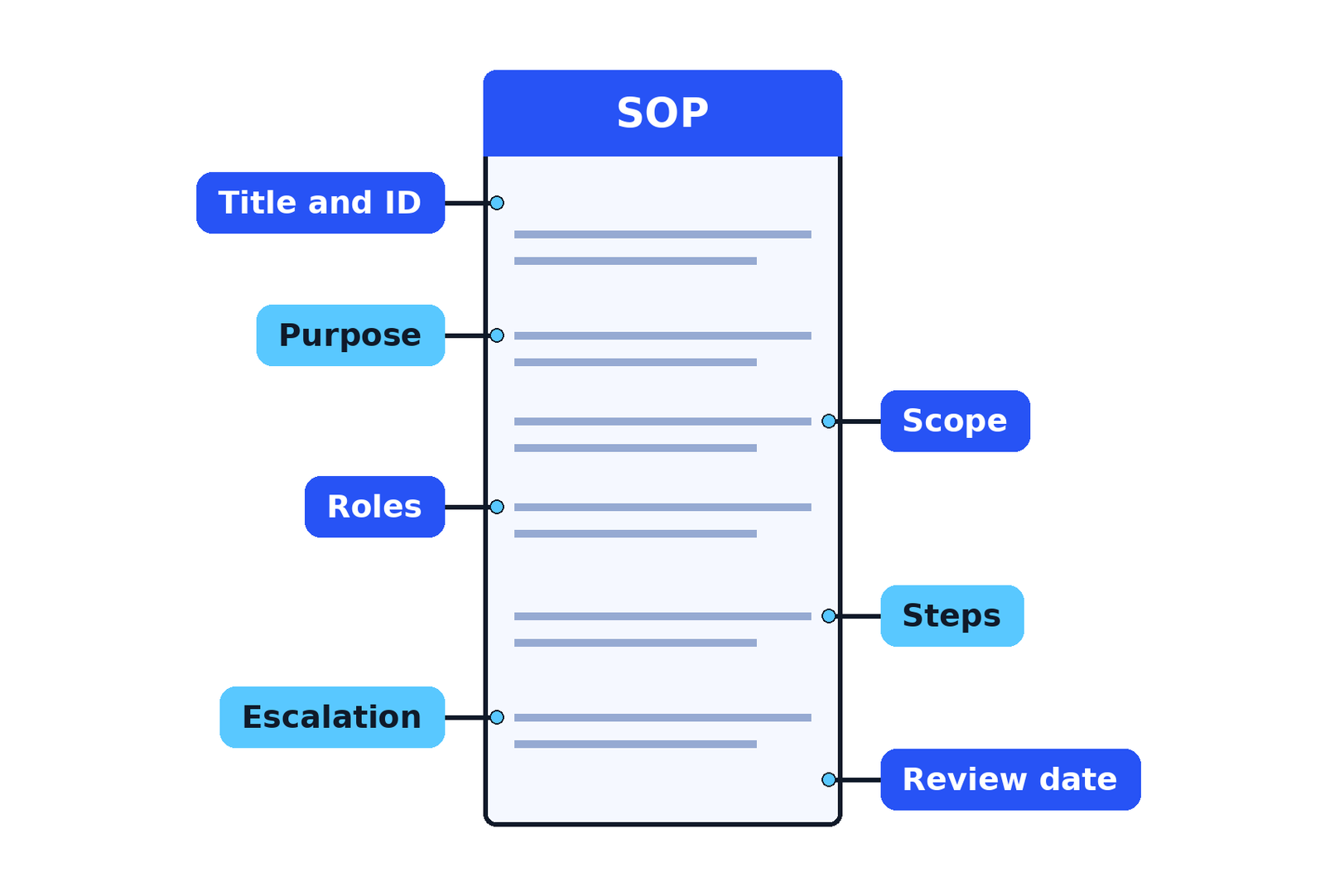
SOPs vary by industry, but the skeleton is the same almost everywhere. BDC, the Business Development Bank of Canada, lists the standard parts as the purpose, the scope, definitions, required supplies or equipment, responsibilities, training requirements, and the step-by-step procedure itself, with an estimated time as an option. For a small business, these eight parts are enough:
| Part | What it holds | Why it matters |
|---|---|---|
| Title and ID | The task name and a short code, such as SOP-CS-001 | Staff can refer to one exact document, not “that refund thing” |
| Purpose | One or two lines on what this SOP guarantees | Readers know why the steps exist before they follow them |
| Scope | Where it applies, and any limit, such as a money ceiling | Stops arguments about which cases the SOP covers |
| Roles | The named roles that act, such as support agent or office manager | Every step has an owner, so nothing waits on “someone” |
| Definitions and tools | Jargon explained, plus the systems and forms used | A new starter can follow it on day one |
| Steps | The numbered actions, in order, each with an owner and a time limit | This is the SOP itself, the part people follow |
| Escalation | What goes wrong often enough to plan for, and who takes over | Problems move up fast instead of sitting in an inbox |
| Review date and version | When it was approved, its version number, and when it is reviewed next | Old instructions get caught and updated instead of drifting |
Two of these parts do more work than the rest. The time limits turn “soon” into a promise you can check. And the review date is what stops the document from quietly going out of date the first time the process changes.
How to write an SOP
Write your first SOP for the task that goes wrong most often, not for the whole company at once. HubSpot lists the procedures businesses document most, and the same two areas come up again and again: HR tasks such as employee onboarding, and customer service tasks such as refund requests. That is why the two examples in this guide cover exactly those. The writing method is the same for any task:
- Pick one process and watch it happen. Sit with the person who does the task today and note what they actually do, in order. Write the real method, not the ideal one. You can improve it in step 4.
- Name the start and the finish. An SOP begins with a clear trigger (“a refund request arrives”) and ends with a clear result (“the refund is issued and logged”). If you cannot name both, the process is too big for one SOP, so split it.
- Write the steps in the order the work happens. One action per step, in plain words, with the role that owns it. If a step needs a decision, write the rule for the decision (“approve if the item is unused and inside the 30-day window”).
- Put a time limit on every step. Use hours for same-day steps and business days for anything that crosses days, because “3 days” means two different dates depending on whether weekends count. A step without a time limit is a wish, not a procedure.
- Add the escalation line. Every process has a case that does not fit: too much money, an angry customer, a missing delivery. Write down who takes over and how fast, while you are calm, not during the problem.
- Test it with a fresh reader. Give the draft to someone who has never done the task and watch them follow it without help. Every question they ask is a gap in the document. Fix the gaps, not the reader.
- Approve it, date it, and set the review. The owner signs it off, you add the version number and effective date, and you set the next review, usually in 6 to 12 months, or sooner if the process changes. Store it where the team already works, in one place, so there is only ever one current version.
Keep the language at the level of the newest person who will use it. Short sentences, normal words, no internal shorthand that only long-serving staff understand.
Example 1: Customer refund SOP for a small online store
This is a complete example, written for a small online store selling physical products. Copy it and change the parts in brackets to match your store: the refund window, the money limits, and your system names. (Example SOP, adapt the limits to your own policy.)
SOP-CS-001: Processing a customer refund
Owner: Store Manager · Version: 1.0 · Effective: [date] · Next review: [date, 12 months later]
Purpose: Every refund is handled the same way, the customer gets a clear answer fast, and no refund is lost, duplicated, or left waiting.
Scope: All refund requests for orders placed on the online store. This SOP covers refunds up to [$250]. Anything above that limit goes to escalation (step 8).
Roles: Customer Support Agent (handles the request), Warehouse Assistant (checks returned items), Store Manager (approves large or difficult cases), Bookkeeper (reconciles the money).
Tools: Order system, shared support inbox, refund log spreadsheet.
Steps:
- Log the request. The Support Agent records every refund request in the refund log within 2 working hours of it arriving, with the order number, customer name, and reason. No request is handled from memory or from a chat window alone.
- Check the order. Within the same working day, the Support Agent checks three things: the order was delivered, the request is inside the [30-day] returns window, and what the customer is asking for (refund, replacement, or repair).
- Decide using the policy rules. Faulty or wrong item: full refund including delivery charges. Changed mind, item unused and complete: refund of the item price, delivery charge kept. Item used or damaged by the customer: decline politely and offer [store credit] if your policy allows it. The Support Agent can approve refunds up to [$100].
- Arrange the return. If the item must come back, the Support Agent emails the prepaid return label within 4 working hours of the decision and tells the customer how to pack the item and where to drop it.
- Check the returned item. The Warehouse Assistant checks each returned item within 1 business day of arrival and marks it in the log as resellable, faulty, or damaged. If nothing arrives within [10 business days] of the label being sent, the Support Agent emails the customer once to ask, then closes the case.
- Issue the refund. The Support Agent issues the refund to the original payment method within 2 business days of the item check (or of the decision, if no return was needed) and updates the log with the amount and the refund reference.
- Tell the customer. On the same day the refund is issued, the Support Agent emails the customer the amount and the date, and notes that banks usually take 3 to 5 business days to show the money. Most “where is my refund” messages come from skipping this step.
- Escalate the exceptions. The Support Agent passes a case to the Store Manager within 1 working hour if any of these apply: the refund is over [$250], fraud is suspected, the customer has opened a payment dispute, or the customer is threatening public complaints. The Store Manager decides within 1 business day and replies to the customer personally.
- Reconcile weekly. Every Friday, the Bookkeeper matches the refund log against the payment provider’s report. Any mismatch is flagged to the Store Manager the same day.
Done when: The money has left the account, the customer has been told, and the log line is complete.
Example 2: New employee onboarding SOP for a small office
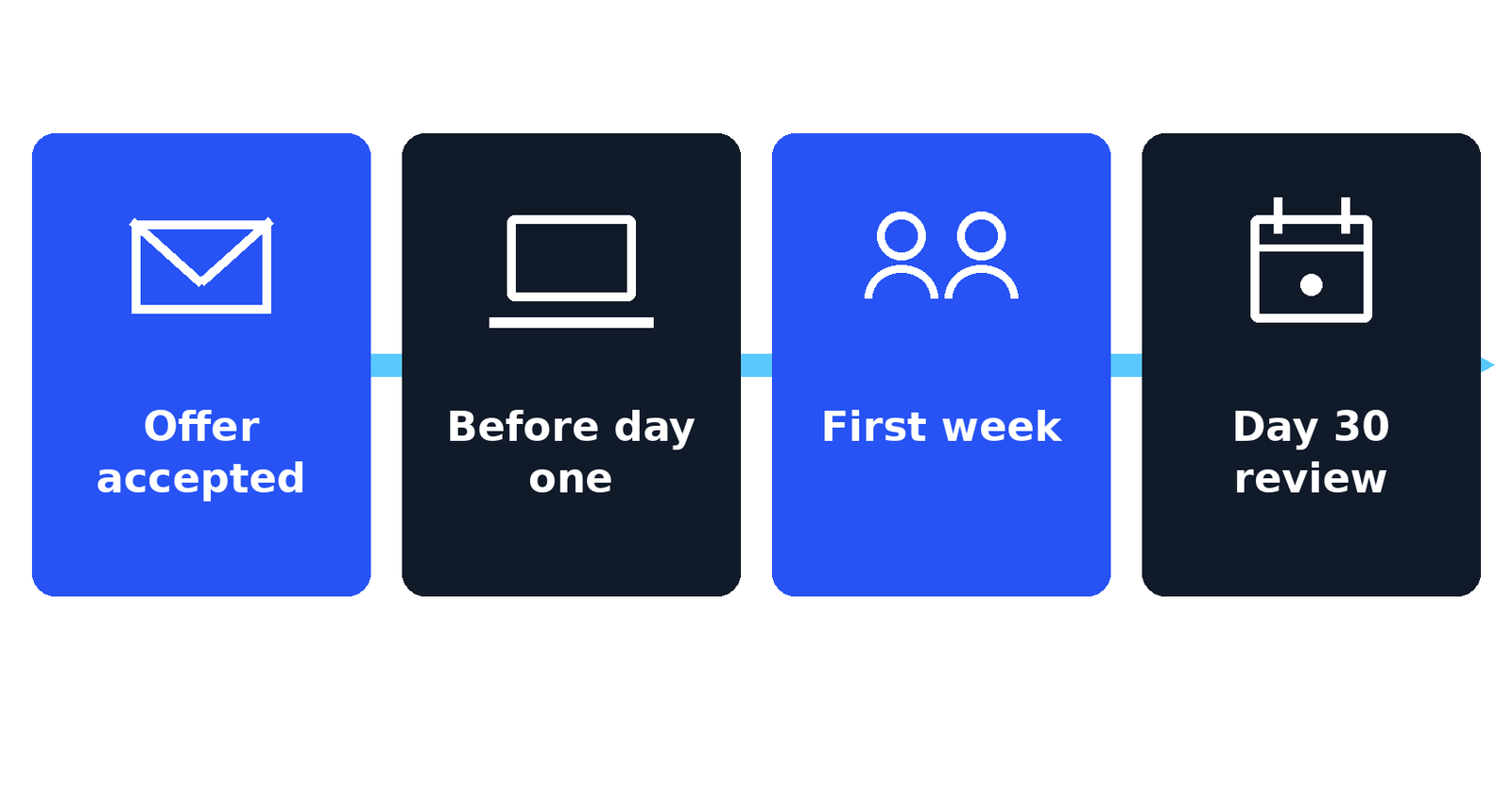
The second example covers the first month of a new hire in a small office. HubSpot’s template library puts the employee onboarding SOP at the top of the HR list, and for good reason: it is the process with the most small steps owned by different people, which is exactly where things get dropped. Copy it and change the parts in brackets. (Example SOP, adapt to your office and local employment rules.)
SOP-HR-001: Onboarding a new employee
Owner: Office Manager · Version: 1.0 · Effective: [date] · Next review: [date, 12 months later]
Purpose: A new starter has everything they need before day one: a working desk, working logins, signed paperwork, and a plan for the first week. Nothing depends on anyone remembering.
Scope: All new office hires, full-time and part-time. Contractors follow the short version held by the Office Manager.
Roles: Hiring Manager (owns the role and the first-week plan), Office Manager (owns this SOP and the paperwork), IT Support (our external IT provider, creates accounts), Buddy (a named team mate for daily questions).
Tools: Starter record form, equipment order list, accounts request form.
Steps:
- Start the record. Within 1 business day of the offer being accepted, the Hiring Manager sends the Office Manager the signed offer details: name, role, start date, salary, and working pattern.
- Order the equipment. The Office Manager orders the laptop, monitor, and phone from the equipment list at least 3 business days before the start date, and books the delivery to the office.
- Create the accounts. IT Support creates the email account, system logins, and shared drive access 1 business day before the start date. Login details go to the Office Manager on paper or in person, never to the starter’s personal email.
- Prepare the desk. By the end of the day before the start date, the Office Manager sets up the desk, access pass, and a welcome pack with the office basics: wifi, printers, kitchen, fire exits, and who to ask for what.
- Run day one. The Office Manager meets the starter at [9:30 a.m.], completes the paperwork (signed contract copy, tax and bank forms, ID check), and walks the fire exit route before lunch. The Hiring Manager joins for a 30-minute welcome meeting on the role and the first week’s goals.
- Assign the buddy. On day one, the Hiring Manager introduces the named Buddy and shares the first-week plan, with one training session or shadowing block booked for each day.
- Cover the essentials in week one. Within the first 2 working days, the starter completes the safety briefing and reads the SOPs for their own role. The Office Manager confirms each item on the starter record as it is done.
- Fix the gaps on day five. The Hiring Manager holds a 20-minute check-in on day five: what is missing, what is unclear, what access is still not working. Any gap is fixed within 1 business day or escalated under the rule below.
- Close the month. The Office Manager books the day 30 probation review before the end of week two, and the Hiring Manager records the outcome on the starter record after the meeting.
Escalation: If equipment has not arrived by the morning of the day before the start date, the Office Manager calls IT Support and the Owner the same day and agrees a loan laptop. If paperwork is still incomplete after day three, the Hiring Manager follows up with the starter directly. If accounts are not working by the end of day one, IT Support treats it as urgent and fixes it the same day.
Done when: The starter record is complete, the starter has working equipment and logins, and the day 30 review is booked.
Blank SOP template (copy and fill in)
Both examples above were built from this skeleton. The notes in brackets tell you what to write in each part. Delete the notes as you fill it in.
[SOP code, for example SOP-OPS-001]: [Task name]
Owner: [role] · Version: [1.0] · Effective: [date] · Next review: [date]
Purpose: [One or two lines. What does this SOP guarantee if everyone follows it?]
Scope: [Where and when does this apply? Add any limit, such as a money ceiling or an order type, and say what is not covered.]
Roles: [Role name] ([what they do in this process]), [Role name] ([what they do]).
Tools: [Systems, forms, documents, or equipment the steps use.]
Steps:
- [Step name.] [Who] does [what action] within [time limit]. [Add the rule for any decision inside the step.]
- [Step name.] [Who] does [what action] within [time limit].
- [Add as many steps as the task needs. One action per step, in the order the work happens.]
Escalation: If [the case that does not fit: over the limit, missing item, angry customer], [who] passes it to [who] within [time limit]. [Who] decides within [time limit].
Done when: [The result that proves the task is finished, and where it is recorded.]
SOP writing checklist
Before an SOP goes live, check it against this list:
- One process only, with a clear start trigger and a clear “done when” line
- Every step has one owner, named by role, not by “the team”
- Every step has a time limit, in working hours or business days
- Decisions inside steps have a written rule, not “use your judgment”
- Money or approval limits are stated, with the escalation path above them
- A fresh reader has followed it once without asking for help
- Owner, version, effective date, and next review date are on the document
- It is stored in one place, and old copies are deleted or marked as replaced
Small file jobs turn up inside procedures more often than you expect, such as converting a signed form or a data file into the format the next step needs. Our free converter tools handle those in the browser, with no sign-up.
Common SOP mistakes
Most failed SOPs fail in the same few ways. Watch for these when you write yours:
- Writing the ideal process instead of the real one. If the document describes work nobody actually does, staff stop opening it within a week. Document the real method first, then improve it on purpose.
- Covering a whole department in one document. A 30-page “operations SOP” is never read. One SOP per task, short enough to follow while doing the work.
- Steps with no owner. “The order is checked” does not say by whom, so it is done twice or not at all. Every step names a role.
- Steps with no time limit. Without a limit, urgent and lazy cases take the same path. Time limits are what make an SOP checkable.
- No escalation line. The first unusual case stalls the whole process while people work out who decides. Write the exception path before you need it.
- Never reviewing it. Prices change, systems change, people change. TechTarget notes that the direct supervisor should monitor the use of the SOP to keep it employed and maintained. The review date on the document is what makes that happen instead of relying on memory.
An SOP is a living page, not a one-time project. Start with the two or three tasks that hurt most, keep each one short, and let the review cycle keep them honest.
Frequently asked questions
What is an example of a standard operating procedure?
Two common examples are a customer refund SOP, which sets out who logs a refund request, who approves it, and how fast the money goes back, and a new employee onboarding SOP, which lists everything that must be ready before a starter’s first day. This guide gives you a complete version of both that you can copy.
What should an SOP include?
An SOP should include a title and ID, a purpose, a scope with any limits, the roles involved, any definitions and tools, the numbered steps with an owner and a time limit on each, an escalation line for cases that do not fit, and a version with a review date.
How long should an SOP be?
As short as it can be while still covering the task. Most small business SOPs fit on one to three pages. If a document runs much longer, it is probably covering more than one process, so split it into one SOP per task.
Who should write an SOP?
The best SOPs are written by the person who does the task, or by a manager working side by side with that person, then approved by the process owner. The people who do the work know the real steps, including the small ones that never reach a manager’s desk.
How often should SOPs be reviewed?
Review each SOP at least once a year, and sooner whenever the process, the tools, or the rules behind it change. Put the next review date on the document itself, so the review is a date on a calendar, not a good intention.
Sources

Jimmy
Jimmy is the editor behind TechyHunt. He covers business software, cybersecurity and practical tech how-tos, and leads testing for the site's free converter tools. His focus is clear, jargon-free guides that help readers make smarter tech decisions, faster.
Every article follows our Editorial Standards. Spotted an error? Tell us.