On this page
- What an employee communication app actually does
- How we compared these apps
- The apps compared
- Slack: best for office teams that live in channels
- Microsoft Teams: best for companies already on Microsoft 365
- Connecteam: best for deskless and frontline teams
- Pumble: best for small teams that want a strong free plan
- Troop Messenger: best for low per seat cost and self hosting
- Google Chat: best for teams already on Google Workspace
- Staffbase: best for large companies that need a branded employee app
- What one year actually costs a 25 person company
- Which app fits your kind of company
- Employee communication apps vs customer messaging platforms
- Before you roll one out
- Frequently asked questions
- What is the best free employee communication app?
- How much does an employee communication app cost for a 25 person company?
- Slack or Microsoft Teams: which is better for a small business?
- What is the difference between an employee communication app and a customer messaging platform?
- Can an employee communication app replace WhatsApp groups for work?
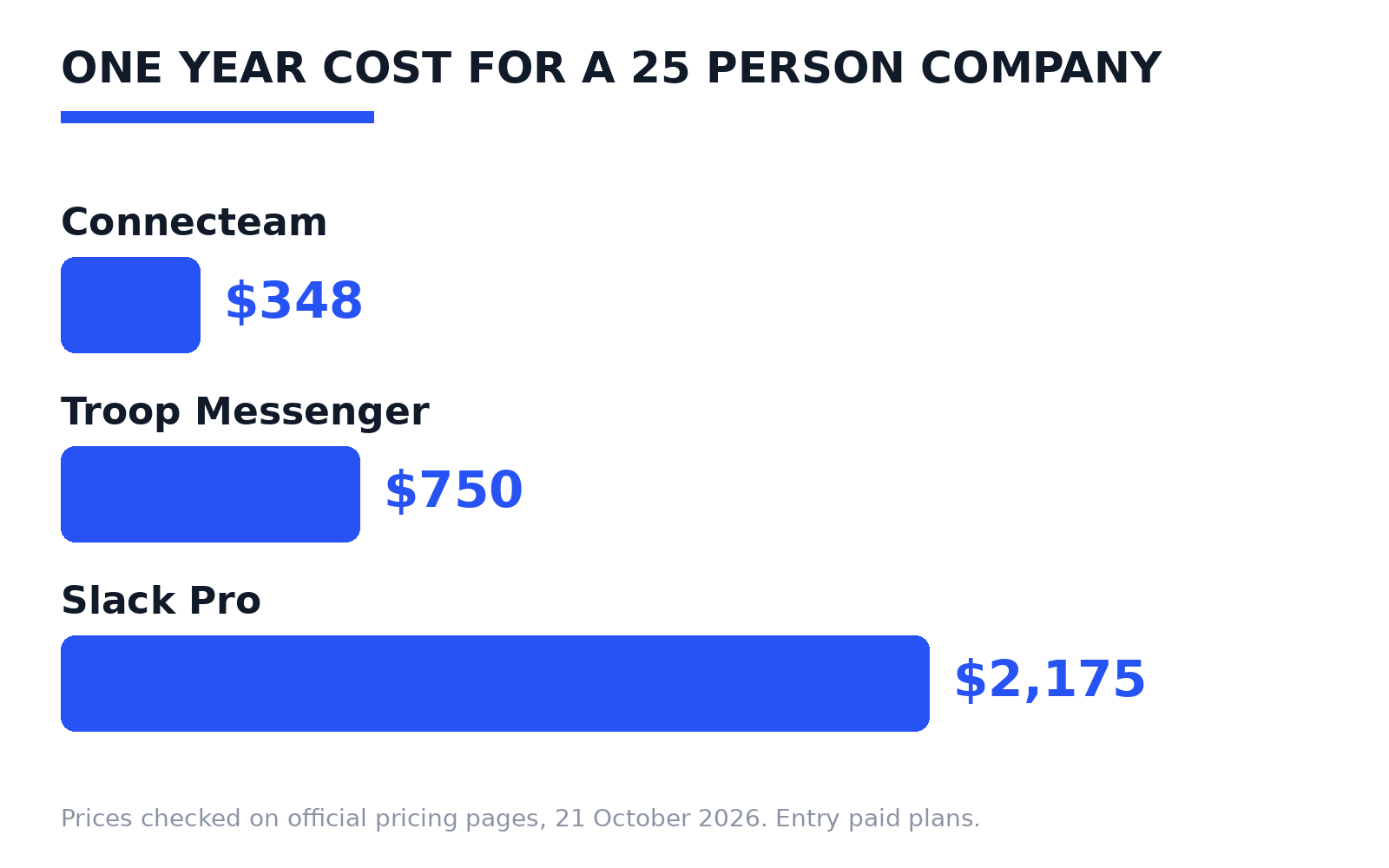
Quick answer: An employee communication app gives your staff one company owned place for team chat, announcements, and calls, instead of personal WhatsApp groups and email threads. For a 25 person company, one year on an entry paid plan costs between $348 and $2,175, based on prices checked on official pricing pages. The right pick depends on where your staff work: at desks, or out on shifts with only a phone.
Most comparison pages here mix two different kinds of software and copy prices from other listicles. This guide does it differently: every price was read on the vendor’s own pricing page, and where a page would not show a readable price, we say so. It also separates employee apps from customer messaging platforms, the confusion behind most buying mistakes in this category.
What an employee communication app actually does
An employee communication app is a closed system for people who work at your company, and it covers four jobs:
- Team chat: direct messages and group channels for projects, teams, and locations.
- Company announcements: a feed for news, policy changes, and shift updates, often with read receipts.
- Calls: voice and video calls inside the same app, so staff never hand out personal numbers.
- Staff directory: a searchable list of who works where, which matters when staff lack a company email.
Two things separate these tools from the group chats most companies start with. The first is control: when someone leaves, the company removes their account and the history stays. The second is reach: frontline staff usually have no desk and no work email, so the app has to work well on a personal phone.
One name is missing on purpose: Meta Workplace is not listed, because Meta has discontinued it.
How we compared these apps
We checked seven tools against the same four questions. What does the entry paid plan cost? Is there a real free plan? What kind of workforce is it built for? And which pricing rule changes the real bill, such as a flat fee instead of per seat pricing?
Prices are in US dollars. Where a vendor offers annual and monthly billing, the annual figure is the headline and the monthly figure is named too. Treat these as a checked snapshot from 21 October 2026 and confirm before you buy. Microsoft and Pumble showed no readable prices in text form, so theirs are marked TO CHECK rather than guessed; Staffbase publishes no prices, by choice.
The apps compared
| App | Starting price | Free plan | Best for | Standout point |
|---|---|---|---|---|
| Slack | $7.25 per user/month (Pro, billed annually) | Yes | Office teams that work in channels | 2,600+ app directory, but free keeps only 90 days of history |
| Microsoft Teams | Bundled with Microsoft 365 plans (price TO CHECK) | Yes | Companies already on Microsoft 365 | Chat and meetings inside the same subscription as Word and Outlook |
| Connecteam | $29/month flat for the first 30 users (Communications Hub, annually) | Yes | Deskless and frontline teams | Flat fee, not per seat, with scheduling and a time clock built in |
| Pumble | Free plan; paid price TO CHECK | Yes | Small teams on a tight budget | Free plan keeps unlimited users and full message history |
| Troop Messenger | $2.50 per user/month (Premium) | No, free trials only | Budget teams and security focused buyers | Lowest per seat price here, plus a self hosted tier |
| Google Chat | Part of Google Workspace (Starter $7 per user/month) | No | Teams already on Google Workspace | No extra tool to buy or teach if Workspace is in place |
| Staffbase | Not published, quote only | No | Large companies needing a branded employee app | Publishes no prices at all; built for targeted company news |
Slack: best for office teams that live in channels
Slack is the channel based chat tool most office teams already know: channels for projects and topics, direct messages, and quick audio and video huddles.
The free plan costs $0, but keeps only 90 days of message history and allows up to 10 apps. Pro costs $7.25 per user per month billed annually, or $8.75 monthly, and removes both limits. Business+ costs $15 billed annually.
Pick Slack if your team sits at desks and needs old conversations to stay searchable. Skip it if most staff are frontline workers: you would pay per seat for depth they will never open.
Microsoft Teams: best for companies already on Microsoft 365
Teams combines chat, channels, and video meetings, and reaches most companies inside a Microsoft 365 subscription. Microsoft also sells a standalone version, Teams Essentials, for small businesses, and a free version exists for getting started.
Microsoft’s pages did not show readable dollar prices during our check, so this guide prints no Teams figure. Check the current price on the official plan comparison before you budget.
The logic is simple. If your company already pays for Microsoft 365, Teams is likely already in your subscription, and a second chat tool needs a strong reason. If not, compare the full subscription, not just the chat feature.
Connecteam: best for deskless and frontline teams
Connecteam is built for staff who do not sit at a desk: retail, hospitality, construction, cleaning, care, and delivery teams. Its Communications Hub covers chat, a company feed, a staff directory, surveys, and a knowledge base. Two sibling hubs add shift scheduling with a GPS time clock, and HR tools such as time off and training.
The pricing model is the standout. Communications Hub Basic costs a flat $29 per month for the first 30 users on annual billing, or $35 monthly, and each user beyond 30 costs $0.50 per month. Two free routes exist: a Small Business Plan, free for companies with fewer than 10 employees, and a Limited plan, free for up to 30 users.
Pick Connecteam if your staff work shifts and need schedules and chat in one place.
Pumble: best for small teams that want a strong free plan
Pumble is a Slack style chat tool with channels, threads, direct messages, and video calls. Its free plan is the most generous in this guide: the official pricing page confirms unlimited users and full chat history, free forever. Paid tiers add guest access, larger file storage, and admin controls.
Its paid prices did not render in readable text during this check, so they are marked TO CHECK rather than printed. The free plan itself is confirmed, and many small teams can run on it for a long time.
Pick Pumble if you want channel based chat on a budget close to zero. The trade off is a smaller app ecosystem than Slack’s.
Troop Messenger: best for low per seat cost and self hosting
Troop Messenger is a team messaging tool with group chat, audio and video calls, screen sharing, and guest access. Premium costs $2.50 per user per month, the lowest per seat price in this guide. Enterprise costs $5, and a Superior tier from $9 per user per month covers self hosted deployments for 500 or more users.
There is no free plan, only free trials, so budget from day one. One check before you buy: the pricing page still carries discount footnotes dated 2019, so confirm your final price in writing.
Pick Troop Messenger if per seat cost is your main pressure, or if your industry pushes you toward self hosting.
Google Chat: best for teams already on Google Workspace
Google Chat is the messaging app inside Google Workspace, next to Gmail, Drive, and Meet. Its spaces work like channels, and staff who live in Gmail need no new account or app to learn.
There is no separate Chat price and no free Workspace tier for businesses. Chat comes with paid Workspace plans, and the official Google Workspace pricing page lists the Starter plan at $7 per user per month on a one year commitment, with a lower introductory rate for new customers.
Pick Google Chat if your company already pays for Workspace. The question is whether Slack’s extra depth justifies a second subscription.
Staffbase: best for large companies that need a branded employee app
Staffbase is an enterprise internal communications platform. Instead of leading with channels, it leads with a branded employee app, targeted news, and publishing across app, intranet, email, and digital signage. It is built for communications teams at large, spread out companies.
Staffbase publishes no prices. Its pricing page FAQ says a published price would be wrong for most organisations, so every deal starts with a tailored quote. There is no free plan and no self serve signup.
Pick Staffbase if you run thousands of staff across sites and countries. Small companies should read the quote only model as a signal: this tool is not aimed at them.
What one year actually costs a 25 person company
Per user prices look small until you multiply them. Here is the real first year cost for 25 staff, on the entry paid plans above, with annual billing where offered.
- Slack Pro: $7.25 x 25 staff = $181.25 per month, which is $2,175 for the year. Paying monthly instead costs $8.75 x 25 x 12 = $2,625, so billing choice alone is worth $450 a year.
- Troop Messenger Premium: $2.50 x 25 staff = $62.50 per month, which is $750 for the year.
- Connecteam Communications Hub Basic: the flat $29 per month already covers the first 30 users, so all 25 staff fit inside it: $348 for the year on annual billing, or $420 paying monthly. Even at 40 staff, $29 plus 10 extra users at $0.50 comes to $34 per month.
The pattern matters more than the winner. Per seat tools charge again for every hire, while a flat fee does not move until you pass the user cap. Run the same maths with your own headcount before comparing feature lists. And keep the calendar in mind: leave and notice periods are usually counted in business days, not calendar days, so annual contracts and monthly budgets rarely line up as neatly as pricing pages suggest.
Which app fits your kind of company
Deskless or frontline workforce (retail, hospitality, construction, care). Start with Connecteam: chat next to scheduling and a GPS time clock, staff joining by phone instead of work email, and a flat fee that holds while headcount moves. At enterprise scale, Staffbase is the step up.
Office team (desk based, project work, many connected tools). Start with Slack if integrations and searchable history matter most, or Teams if your company already pays for Microsoft 365. Both are built around channels and files, for staff at a computer most of the day.
Small business (under 30 staff, budget first). Start free: Pumble keeps your full message history, and Connecteam’s free tiers cover very small teams. For a small, predictable bill, Troop Messenger at $2.50 per user per month is the cheapest paid start here. Move up only when you hit a real limit, like guest access or admin controls.
Employee communication apps vs customer messaging platforms
These two categories sound similar, and some vendors blur them on purpose.
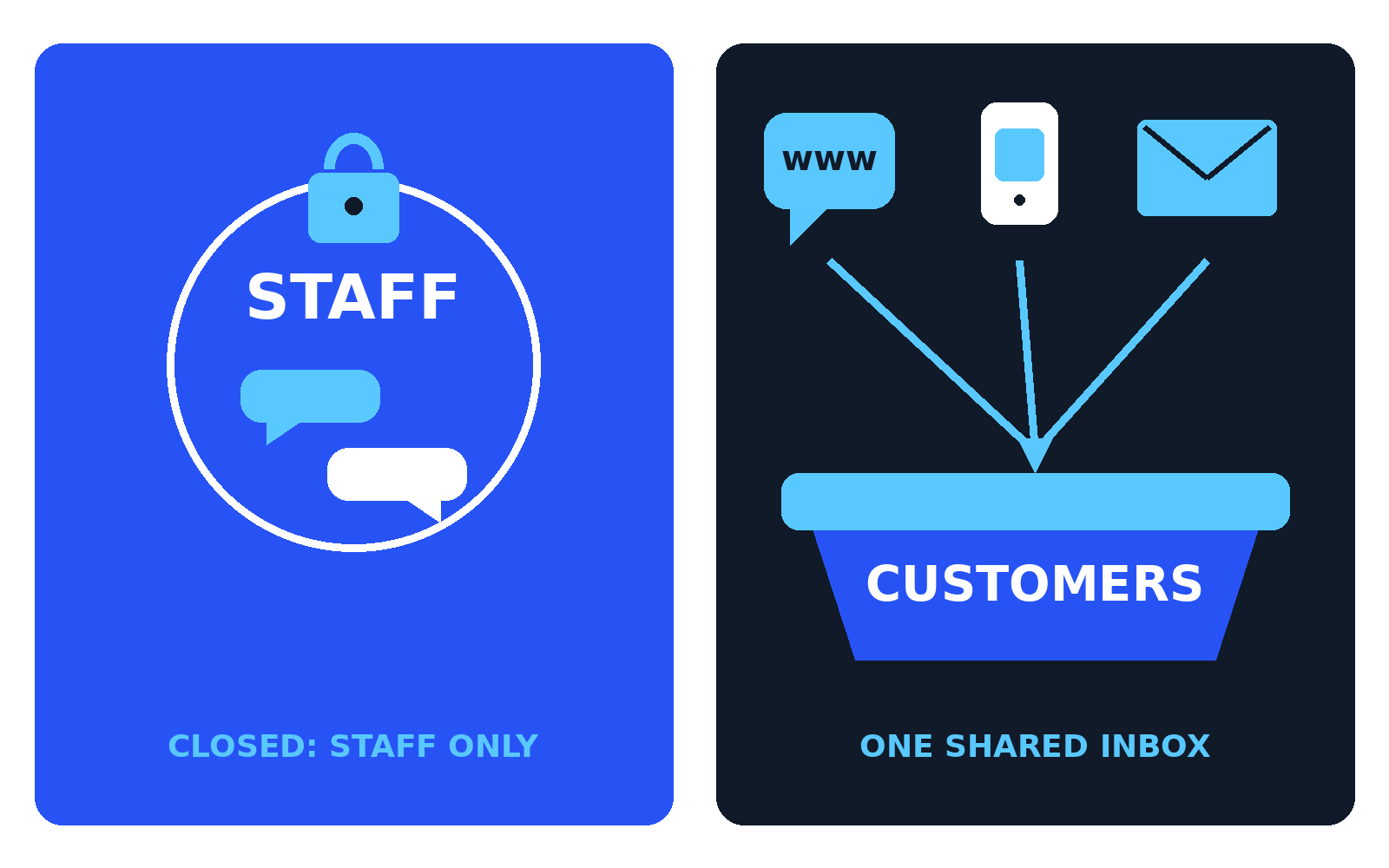
An employee app is a closed system: only your staff hold accounts, and customers never see it. A customer messaging platform faces outward: it collects your website chat, WhatsApp, social pages, and email into one shared inbox your support or sales team answers. Tools in that second category include Intercom, Zendesk, and Freshchat.
| Question | Employee communication app | Customer messaging platform |
|---|---|---|
| Who sends the messages | Your staff | Your customers |
| Where messages come from | Inside one closed app | Website chat, WhatsApp, social media, email |
| Main job | Coordination, announcements, shift updates | Support questions, sales enquiries, onboarding help |
| Who needs a paid seat | Every employee | Only the agents who reply |
| Risk if you skip it | Staff run work through personal WhatsApp groups you do not control | Customer messages get lost across channels and inboxes |
When a business needs each, or both. Buy the employee app when the problem is inside the company: rotas, announcements, team coordination. Buy the customer platform when the problem faces outward: customers asking questions on your website or WhatsApp and getting slow replies, or none. Many growing companies end up with both, because the audiences never overlap. The expensive mistake is stretching one tool across both jobs: an internal chat tool gives customers no way in, and a support inbox is a poor place to announce a shift pattern.
One bridge exists: Troop Messenger’s Click2Magic add on, at $2 per user per month, bolts a customer help desk onto the internal tool. It suits a very small team answering a handful of chats. Once volume grows, a dedicated platform is safer.
Before you roll one out
Three rules save most failed rollouts: pick one app and close the old groups, name channels by project or location, and put official announcements only in the app so checking it becomes part of the working day. Our free converter tools handle small conversion jobs during setup, in the browser, with no sign up.
Frequently asked questions
What is the best free employee communication app?
For most small teams, Pumble. Its free plan, confirmed on its official pricing page, allows unlimited users and keeps your entire message history. Slack’s free plan keeps only 90 days of history. Connecteam also has free tiers, for up to 10 and up to 30 users.
How much does an employee communication app cost for a 25 person company?
On the entry paid plans checked on official pricing pages, one year for 25 staff costs $348 on Connecteam’s flat fee Basic plan, $750 on Troop Messenger Premium, and $2,175 on Slack Pro. Per seat tools rise with every hire; flat fees stay fixed until the user cap.
Slack or Microsoft Teams: which is better for a small business?
If your company already pays for Microsoft 365, Teams is usually the sensible pick, because it is inside the subscription. If not, Slack is the stronger standalone chat tool, with a larger app directory and a free plan (90 days of history only).
What is the difference between an employee communication app and a customer messaging platform?
An employee app is a closed system for staff: team chat, announcements, and calls that customers never see. A customer messaging platform faces outward and pulls website chat, WhatsApp, social media, and email messages into one shared inbox for your support or sales team. The audiences and jobs differ, which is why many companies run one of each.
Can an employee communication app replace WhatsApp groups for work?
Yes, and control is the main reason. In personal WhatsApp groups the company owns nothing: a leaving employee keeps the history and any customer contacts in it. In an employee app, the company manages the accounts, removes leavers the same day, and keeps the record.
Sources

Jimmy
Jimmy is the editor behind TechyHunt. He covers business software, cybersecurity and practical tech how-tos, and leads testing for the site's free converter tools. His focus is clear, jargon-free guides that help readers make smarter tech decisions, faster.
Every article follows our Editorial Standards. Spotted an error? Tell us.