
On this page
- Why no platform will ever confirm a block
- The signs matrix: what each sign is really worth
- Check in this order: the self-test flow
- Blocked, or something else? How to tell the difference
- The signs platform by platform
- iPhone, calls, and iMessage
- Android and Google Messages (RCS)
- Messenger
- What to do next
- Frequently asked questions
- Can an app tell me for sure if someone blocked me?
- If I hide my number and the call rings, does that prove I am blocked?
- Will my messages arrive later if the person unblocks me?
- How long should I wait before I conclude I am blocked?
- What if I was blocked by accident?
- Can someone block me on one app but not another?
Quick answer: No phone and no app will ever tell you that someone blocked you. That silence is deliberate. Apple, WhatsApp, and Instagram all refuse to notify the blocked person, and each platform says so in its own help pages. What you can do is read the pattern. One sign on its own proves almost nothing. Three or four signs, lasting for days, with every innocent cause ruled out, point strongly to a block.
This guide walks through the signs platform by platform, rates how much each sign is worth, and then gives you an order to check them in, starting with the checks that bother nobody and ending with the ones you should only use once. It also covers the other explanations, because a flat battery and a block can look exactly the same from your side of the screen.
Why no platform will ever confirm a block
Blocking is a privacy tool, so the platforms design it to be quiet. Apple Support explains that when you block a number on an iPhone, the contact gets no notification that the call or message was blocked, and messages from them are simply not delivered. WhatsApp takes the same line and lists the signs a blocked person might notice, while stressing that the signs are kept ambiguous on purpose, to protect the person who did the blocking. Instagram is just as blunt in its help centre: people are not notified when you block them.
That design has one honest consequence for this whole topic. You are never proving a block the way you would prove a delivery. You are building a case from side effects, and a good guide should tell you how strong each side effect is. That is what the matrix below does.
The signs matrix: what each sign is really worth
Read the reliability column before you panic. A Strong sign still needs company. A Weak sign means the same thing happens for innocent reasons all the time. And some things that feel like proof prove nothing at all.
| Sign | Platform | What it means | Reliability |
|---|---|---|---|
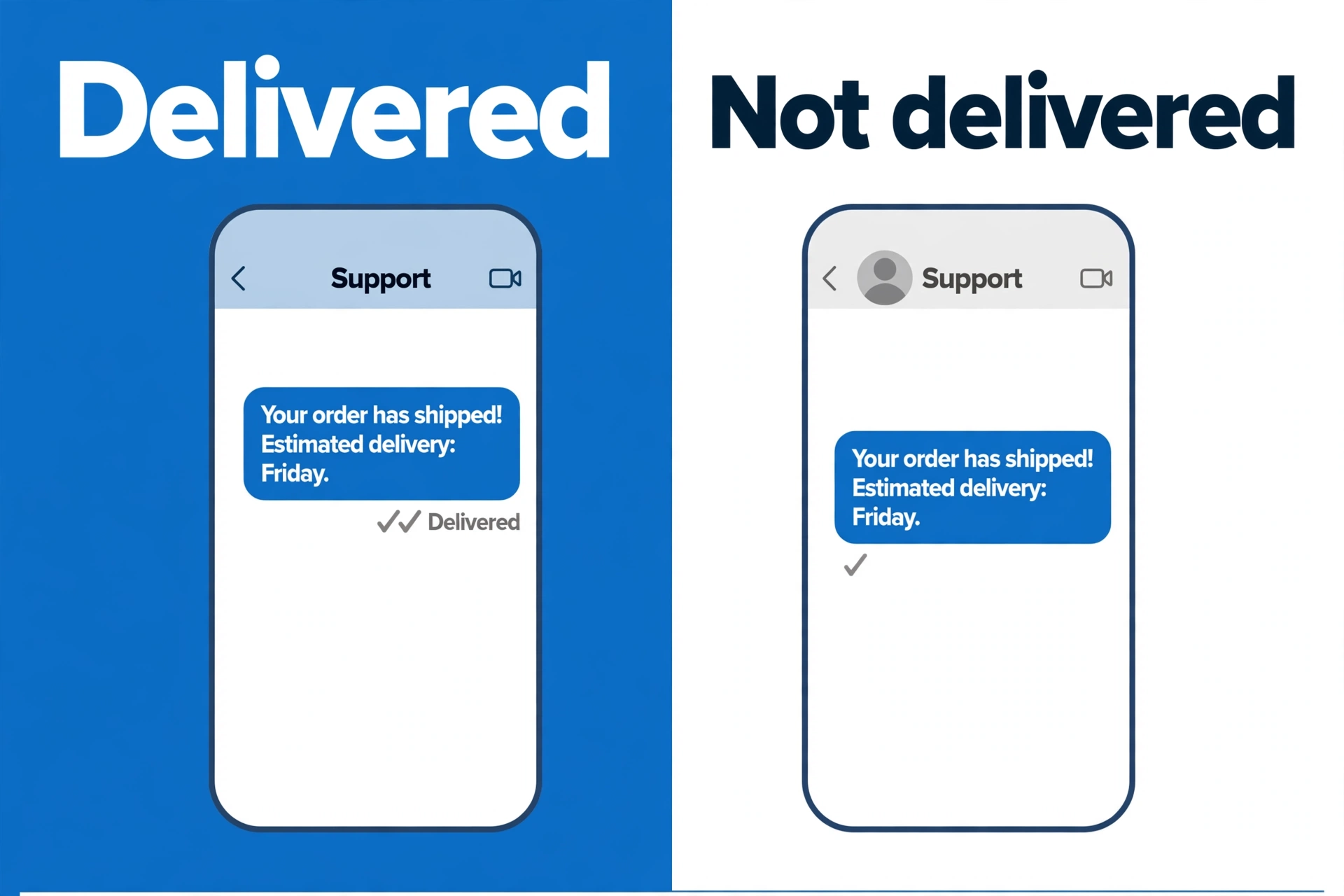
| Your messages never show “Delivered” under them, for days | iMessage (iPhone) | Messages from a blocked number are not delivered, so the word never appears | Strong sign, with other signs |
| Your blue iMessage bubbles turn green and send as SMS instead | iMessage (iPhone) | Your phone could not reach them on iMessage and fell back to text | Weak sign |
| Calls ring once, or not at all, then go to voicemail, every time for days | Phone (iPhone and Android) | A blocked call is sent away at once instead of ringing normally | Strong sign, with other signs |
| You can still leave a voicemail | Phone (iPhone) | Apple lets blocked callers leave voicemail. The owner just gets no notification | Proves nothing alone |
| Messages stay on one grey tick and never reach two | The message left your phone but never reached theirs. That is WhatsApp’s own listed sign of a block | Strong sign, with other signs | |
| Their profile photo, status updates, and “about” line vanish or freeze | A blocked person stops seeing profile updates. That is also on WhatsApp’s list | Weak sign | |
| You can no longer see their “last seen” or “online” status | Also on WhatsApp’s list, but anyone can hide these in privacy settings | Weak sign | |
| Your WhatsApp calls never connect | WhatsApp lists failed calls as a sign, but calls also fail with no data signal | Weak sign | |
| You cannot add them to a WhatsApp group you run | WhatsApp lists this too. A group admin cannot add someone who blocked them | Strong sign, with other signs | |
| Messages fall back to SMS, or never show Delivered or Read | Google Messages (RCS) | Their RCS may be off, their phone may be off, or you may be blocked | Weak sign |
| Their Instagram profile cannot be found, and your old thread stays but new messages are not received | Instagram hides the profile from a blocked person, and messages sent while blocked are not received | Strong sign, with other signs | |
| The person looks “unavailable” in Messenger, or your messages fail to send | Messenger | Meta gives almost no signal here. A deactivated account looks the same | Weak sign |
Two patterns matter more than any single row. First, a block is permanent until the person undoes it, so block signs stay identical for days. A dead battery, a flight, or a day with no signal fixes itself. Second, a block usually hits every channel on that platform at once: messages, calls, and profile together. One broken channel is usually a settings problem, not a block.
Check in this order: the self-test flow
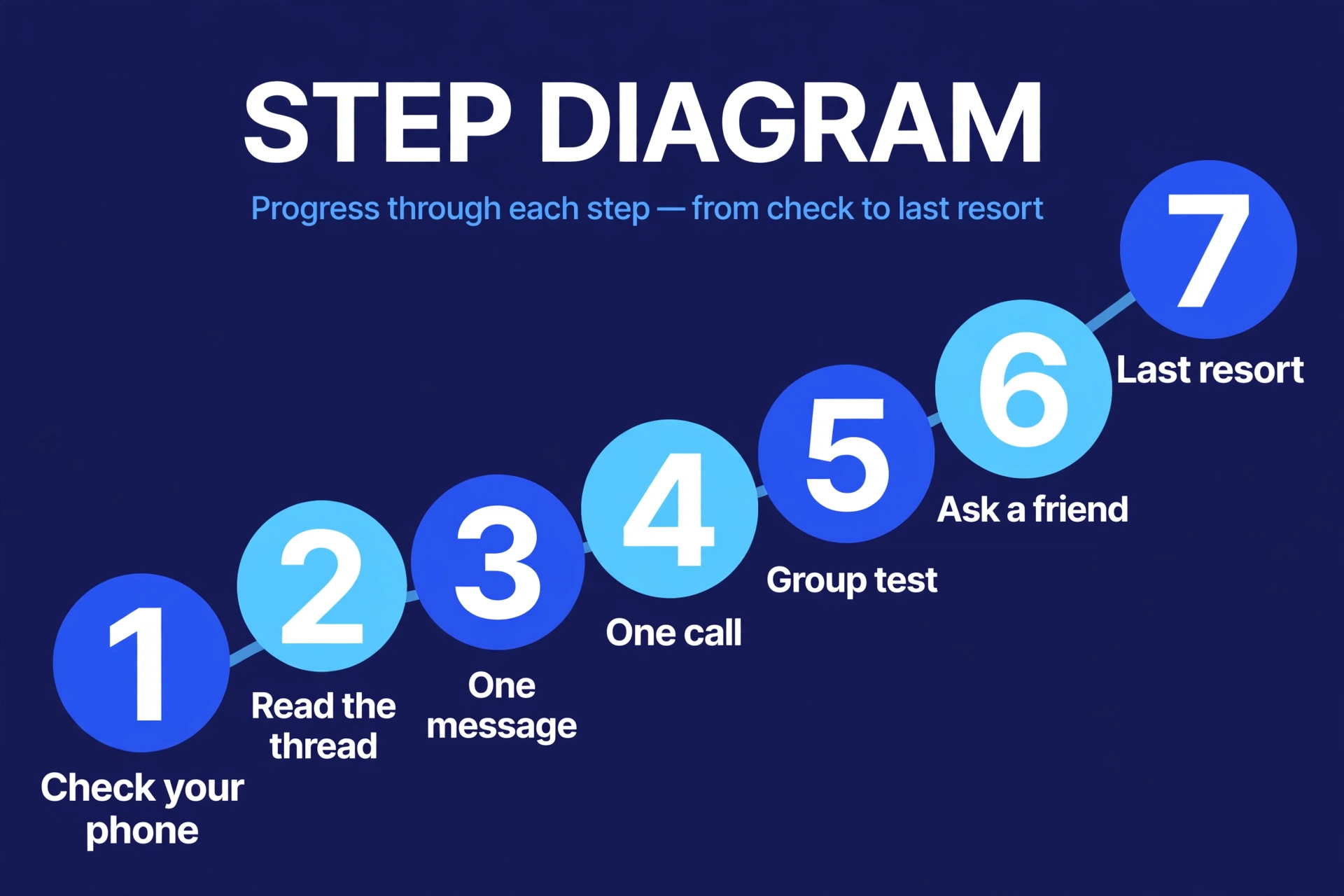
Work down this list and stop as soon as you have your answer. Each step is more conclusive than the last, and also more visible to the other person, so there is no reason to start at the bottom.
- Check your own phone first. Send a message to a friend and open a web page, for example our free converter tools, to confirm your data and signal work. If nothing sends to anyone, the problem is your phone or your network, not a block. This step sounds silly and settles a surprising number of cases.
- Look at the old thread, and change nothing. Compare now with how the chat used to look. Did “Delivered” used to appear under your iMessages? Did their WhatsApp photo and last seen used to show? A sudden change across several signs at once is the pattern you are looking for. This step costs the other person nothing, because you are only reading your own screen.
- Send one normal message, then wait. One short message, the kind you would send anyway. Then wait at least a day, ideally two. If it picks up a second tick, a Delivered label, or a reply, you were never blocked. Sending five more messages adds no information, so do not.
- Make one call at a normal hour. Note what happens. A normal call rings several times. A call to a phone that is off goes straight to voicemail with no ring at all. A blocked call often rings once, then drops to voicemail, and does the same thing every time. One call tells you little. The same result over two or three days tells you more.
- On WhatsApp, try the group test once. If you run a group, WhatsApp will not let you add someone who has blocked you. This is one of the strongest single signs on any platform. It still has a caveat: people can also restrict who may add them to groups, in their privacy settings. And do not create a fake group with strangers in it just to run this test. If you do not already have a natural reason, skip to the next step.
- Ask a mutual contact one simple question. On Instagram especially, the cleanest check is whether a friend can see the profile you cannot. If they can see it and you cannot, that is close to conclusive. Keep it to that one question. Do not ask the friend to pass messages or report back on the person’s life. That stops being a check and starts being pressure.
- The hidden number call test, and why it proves little. The test people swear by is hiding your caller ID (in the US, dialling *67 before the number) and calling once. If the call rings normally, your number is probably blocked. Treat that result with care. Many people silence or reject unknown numbers on purpose, and phones can be set to send every unknown caller to voicemail, so a failed hidden call proves nothing. A successful one is not an invitation either. It is a diagnostic, to be used once, at most. Never use number hiding, borrowed phones, or new accounts to keep reaching someone who has shown they do not want contact.
Blocked, or something else? How to tell the difference
Most “blocks” turn out to be one of these. Run your signs against this table before you settle on the worst explanation.
| What is really going on | Your calls | Your messages | How long it lasts | The tell-tale clue |
|---|---|---|---|---|
| You are blocked | Ring once or not at all, then voicemail, the same every time | Never delivered, on every app on that platform | Days, with no change at all | Several signs at once, and other people can still reach them |
| Their phone is off, or the battery is dead | Straight to voicemail with no ring, or a “switched off” message | Sit undelivered until the phone comes back on | Hours, rarely more than a day | Everything starts working again at once, and old messages deliver |
| Do Not Disturb or a Focus mode is on | May ring on their side with no sound, or go to voicemail | Usually delivered, just not announced | Hours, often overnight or at work | “Delivered” still shows under your messages, and replies come later |
| No signal, or airplane mode is on | Fail, or go to voicemail | Sent, not delivered, until they reconnect | Minutes to hours | They reply in a burst when they are back, and apologise for the gap |
| They changed their number | A “number not in service” message, or a stranger answers | Fail, or reach a stranger | Permanent | The new person says they just got the number. This is not about you |
| They are just not replying | Ring normally | Show Delivered, and often Read | As long as they choose | Delivery signs are all healthy. Silence with delivery is a choice, not a block |
The last row is the one people resist. If your messages show Delivered or Read and your calls ring out normally, you are not blocked. You are being left unanswered, which is a different problem, and no setting on your phone can fix it.
The signs platform by platform
iPhone, calls, and iMessage
Apple’s own description is the anchor here. When a number is blocked on an iPhone, that person can still leave a voicemail, but the owner gets no notification, and messages sent or received are not delivered. So from your side, the honest signs are: no “Delivered” under your iMessages for days, calls that ring once and drop to voicemail every time, and voicemails that appear to leave fine but never get a response. Nothing on your screen will ever use the word blocked.
Two false alarms are common on iPhone. If the other person turns iMessage off, loses data, or moves to Android, your bubbles turn green and send as SMS. That looks dramatic and usually means a settings change, not a block. And if their phone is off, your call goes straight to voicemail, exactly as a blocked call can. Time separates these: settings changes and flat batteries resolve, a block does not.
Android and Google Messages (RCS)
Android gives you the least to work with. In Google Messages, an RCS chat shows check marks for sent, delivered, and read. If the other phone is off, out of coverage, or has RCS turned off, your messages fall back to plain SMS and the read signs disappear. Google Messages Help describes blocking from the other side: a blocked sender’s conversation is moved out of sight, and blocking stops their messages arriving. From your side, there is no label that says so. Messages that never show Delivered, over days, while the same person is clearly active elsewhere, are a hint. On Android, treat RCS signs as supporting evidence only, never as the verdict.
WhatsApp is the one platform that publishes its own list of signs, and it is worth using their list rather than internet folklore. If a contact has blocked you, WhatsApp says you may no longer see their last seen or online status, you will not see updates to their profile photo, your messages will show one check mark and never a second, calls you try to place will not go through, and if you are a group admin you will not be able to add them to a group. WhatsApp also warns, in the same place, that it cannot confirm a block for you, and that these signs are ambiguous by design. Every item on that list has an innocent twin in the privacy settings, which is why the combination, held over several days, is what counts.
Instagram hides more than most. When someone blocks you, their profile, posts, and stories are no longer visible to you, and searching their name usually finds nothing. Your old message thread stays in your inbox, which confuses people, but Instagram says messages you send while blocked are not received, and they are not delivered later if you are unblocked. Your likes and comments on their posts are removed, and the follow between you is ended. The clean test here is comparison: if a friend can open the profile and you cannot, and the account is clearly active, that is about as close to proof as any platform gives. Remember that a deactivated or deleted account looks identical from your side, which is why the friend check matters.
Messenger
Messenger is the hardest to read, and any guide that gives you certainty here is guessing. Blocking on Messenger stops messages and calls from that person, and Meta does not notify the blocked person. From your side you may see the person shown as unavailable, or a chat that will not accept new messages, but a deactivated account and some privacy settings produce the same screens. Rate every Messenger sign as weak, and lean on the other platforms and the comparison table instead.
What to do next
Say the signs all line up and stay lined up for days. You are most likely blocked. Here is the part most guides skip: that is the answer, and it is also a boundary.
- Accept it, and stop testing. Every check in this guide is designed to be run once or twice. Running them weekly turns a diagnostic into a campaign, and the other person can see the missed calls piling up.
- Do not route around the block. New accounts, borrowed phones, and apps that promise to reveal or bypass blocks are not a loophole, they are the behaviour blocking exists to stop. No app can see another person’s block list either. Any app that claims it can is guessing, or collecting your contacts and login details. Delete those, and change your password if you signed in to one.
- If there is a real practical matter, use the official channel for it, once. A deposit, a set of keys, a work handover. If you share a workplace, a tenancy, or a family obligation, there is usually a normal channel for that tie (a work email, a letting agent, a group chat you are both still in). One short, factual message through that channel, about the practical matter only. Then let it go, whatever the reply.
- Sit with the boring explanation too. Numbers change, phones break, people get busy and then feel too awkward to restart. A block is one explanation. It is not the only one, and it is rarely worth more than a day of your attention.
You will find more plain English explainers like this one across our tech guides, written to give you the honest version rather than the dramatic one.
Frequently asked questions
Can an app tell me for sure if someone blocked me?
No. No app can see another person’s block list, because no platform publishes that information. Apps and websites that promise a list of people who blocked you are guessing from the same signs in this guide, and many of them exist to harvest your contacts or login details. The signs matrix above is the most anyone can honestly offer.
If I hide my number and the call rings, does that prove I am blocked?
It is suggestive, not proof. It suggests your number is treated differently from an unknown number, which fits a block. But people also silence unknown callers on purpose, reject calls they do not recognise, and miss calls for ordinary reasons. Treat a hidden number call as a one-time diagnostic at most, never as a way to keep calling.
Will my messages arrive later if the person unblocks me?
On Instagram, no. Instagram says messages sent while you are blocked are not received, and are not delivered later if you are unblocked. As a general rule, do not count on messages sent during a block arriving afterwards on any platform. If something matters, and there is a legitimate channel for it, send it through that channel instead.
How long should I wait before I conclude I am blocked?
Give it at least two or three days of identical signs. A phone that is off, a trip with no signal, and a Focus mode all clear within hours. A block is the explanation that stays exactly the same, day after day, across messages, calls, and profile on the same platform.
What if I was blocked by accident?
It happens. Numbers get blocked during spam clean-outs, children play with phones, and a block can carry over when someone sets up a new phone. If you later cross paths through a shared context, the person will usually sort it out themselves. There is nothing useful you can do from your side beyond leaving the door open and moving on.
Can someone block me on one app but not another?
Yes, and it is common. Blocking is handled separately by your phone, WhatsApp, Instagram, and Messenger. Someone can block your number and still be visible on Instagram, or block you on WhatsApp and still answer normal texts. Check each platform on its own signs, and do not average them together.
Sources
- Apple Support: Block phone numbers, contacts, and emails on your iPhone or iPad
- Google Messages Help: Block senders and report spam in Google Messages
- Tech Advisor: How to tell if you've been blocked on WhatsApp (WhatsApp's own list of block indicators)
- Robots.net: How to Know If Someone Blocked You on WhatsApp (summary of the WhatsApp Help Center indicators)
- iGeeksBlog: How to Block or Unblock Someone on Instagram (Instagram Help Center behaviour: no notification, thread stays, messages not received)
- Technobezz: How to Know if Someone Blocked You on Instagram (Instagram's own list of block effects)
- EpicTrick: What happens when you block someone on Facebook Messenger (Messenger Help Center behaviour)
- Avast: How to Know if Someone Blocked Your Number (SERP competitor scan and cross-check)

Jimmy
Jimmy is the editor behind TechyHunt. He covers business software, cybersecurity and practical tech how-tos, and leads testing for the site's free converter tools. His focus is clear, jargon-free guides that help readers make smarter tech decisions, faster.
Every article follows our Editorial Standards. Spotted an error? Tell us.